NewCondition schematics, team pulse and more, shipped this month

One system for
your clinic. Not ten.

Praxa sits on top of Nookal or Cliniko and runs everything around the appointment: messaging, AI notes, exercise programs, billing, marketing, roster and HR. Fewer tabs, fewer missed invoices, and a team that leaves on time.

Works with Nookal & Cliniko Built in an Australian clinic NDIS & DVA ready Unlimited practitioners
Your PMS stays. Praxa syncs every few minutes. Email + password, 2-factor, invite-only team access Switch modules on and off per clinic Works on the phone in the treatment room
The problem

Your clinic runs on ten tabs, ten logins and ten invoices.

A messaging app here, an AI scribe there, a forms tool, an exercise app, a dashboard subscription, a funnel builder, a roster spreadsheet, an incident register in a folder somewhere. Every one of them is "only $100 a month". None of them talk to each other. Praxa is the one that does all of it.

SMS
Patient messaging & remindersAnother login, another bill
AI
AI scribe / clinical notesPriced per clinician
✎
Intake, consent & outcome formsPDFs to file by hand
EX
Exercise prescription appSeparate client logins
KPI
Practice analytics dashboardNumbers a week late
$$
Debt chasing & NDIS deadlinesExcel, sticky notes
FN
Reviews, funnels & newslettersThree more subscriptions
☎
Phone answering & bookingsMissed calls, voicemail
RO
Roster, pay & recruitmentSpreadsheets, job board inbox
HR
Policies, incidents & complaintsDocs, folders, email chains
10 logins · 10 invoices · 0 talking to each other
=
praxa
  • Inbox, AI receptionist, arrival texts and a full calendar
  • Record a session, get the note, letters and forms
  • Intake, outcome measures, exercise programs and condition guides
  • Uninvoiced, aged debt, NDIS 90-day and remittances
  • Reviews, funnels, landing pages, blog and campaigns
  • Daily huddle, tasks, roster, recruitment, HR and handbook
One flat priceUnlimited practitioners. Cancel any time.
Proof

Built inside a real clinic, not a boardroom.

Praxa was built for Integral Movement, an exercise physiology, OT and dietetics clinic in Melbourne, NDIS and DVA registered. It runs their day, every day, and every feature on this page was used there first.

4paid apps replaced on day one: messaging, analytics, scribe and funnels
~$820per month of software subscriptions consolidated into one bill
10 mindaily huddle built from the live diary, so nobody asks "what's on today?"
1 clickfrom arrived appointment to invoice in the PMS, including NDIS codes
A day at your clinic

From the 7:50 huddle to home on time.

Praxa isn't one more app your team has to remember to open. It's the screen that runs the day. Here's what a normal Tuesday looks like.

A clinic team in a short morning stand-up with coffee
Daily huddle · Tuesday10 min
2
Client activity review23 appointments · 4.5h white space · 2 to refill
3 min
4
Teachable moment
"What did a client say this week that changed how you'd explain their program?"
1 min
7:50am
The huddle

Everyone knows the plan before the first client walks in.

The huddle builds itself from your live diary: today's numbers, the gaps to fill, one core value and a one-minute teachable moment. Nobody prepares it, everybody sees the same thing, and it's logged for the weekly meeting.

  • White space and cancellations ready to refill
  • Leader rotates automatically
  • 1,000-entry teachable moment library built in
A receptionist greeting a client at a calm clinic front desk
Sam T. is on the way9:30 · Room 2
On way
Priya K. running 10 min late10:00 · note added to the booking
Late 10
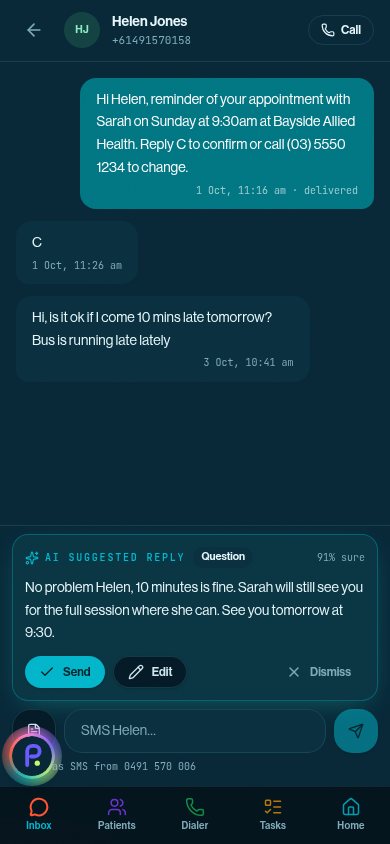
AI reply ready for Helen J."No problem, 10 minutes is fine..."
Send
9:12am
Front desk

Know who's coming, and who's running late, before they arrive.

Two hours before each visit the client gets a link: On my way, I've arrived, Running late or Reschedule. Every text, email and voicemail lands in one inbox with a reply already drafted in a plain human voice. Reception stops juggling four screens.

  • Arrivals and late notes written back to your PMS
  • AI phone receptionist that books and never guesses
  • No self-cancel button, by design
An exercise physiologist coaching a client through a split squat
Recording18:42
Initial assessment · Sam T.Screen locked · still recording
Note drafted in your template
NDIS progress report pre-filled
10:00am
The session

Treat the client. The note writes itself.

Tap the appointment and hit record. Walk the gym floor, lock your phone, it keeps going. When you stop, the note is in your template with the case and referrer pulled through and NDIS or DVA forms pre-filled. The audio is never kept.

  • Guided MSK assessment with 130 special tests
  • 35 outcome measures sent by SMS and scored for you
  • Letters to the GP signed and sent from the note
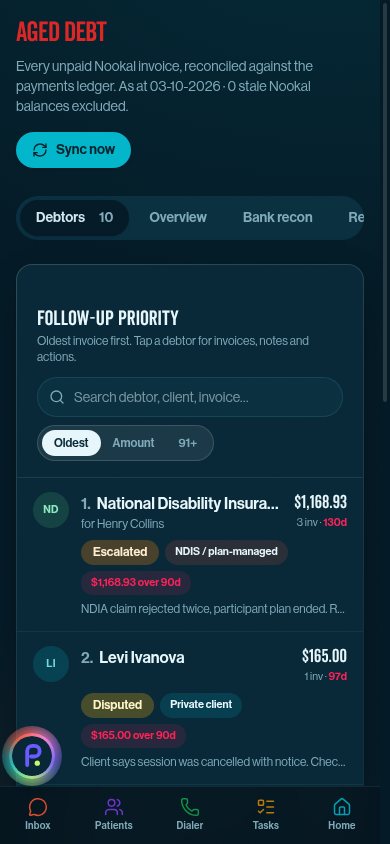
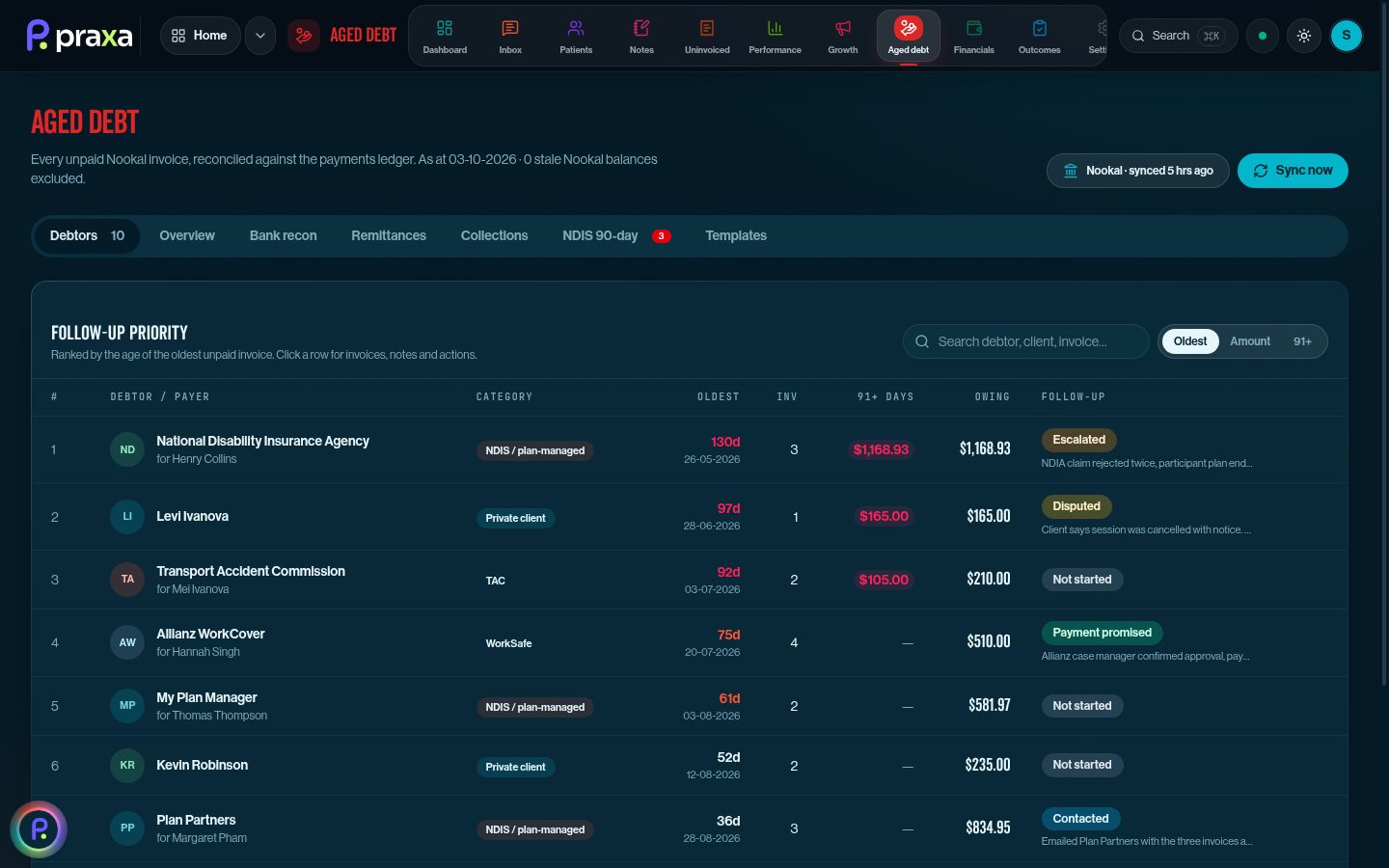
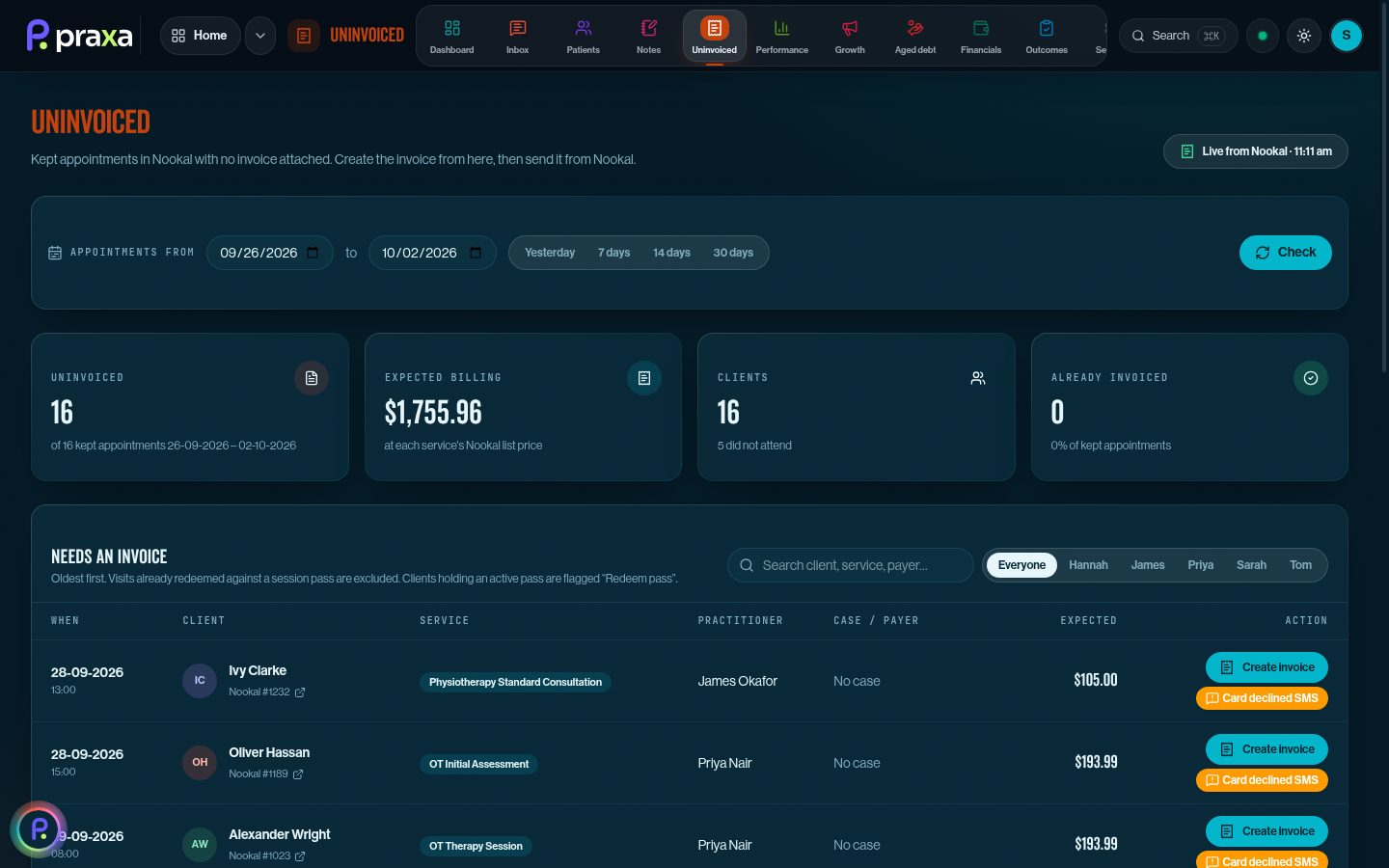
Aged debt: debtors ranked by priority with follow-up status Uninvoiced appointments with Create invoice and Card declined SMS buttons
12:30pm
Billing

Every kept appointment invoiced by lunch.

Praxa lists every arrived appointment, class and pass without an invoice, and creates it in your PMS with one click. Declined cards get a polite SMS in one tap. Plan managers get chased at 7, 14 and 21 days, and NDIS invoices sit on a live 90-day clock so nothing ages out.

  • Remittance emails read and matched to invoices
  • Late cancels billed with the right NDIS code
  • Per-payer off switch for collections
A client doing a supported calf raise at home
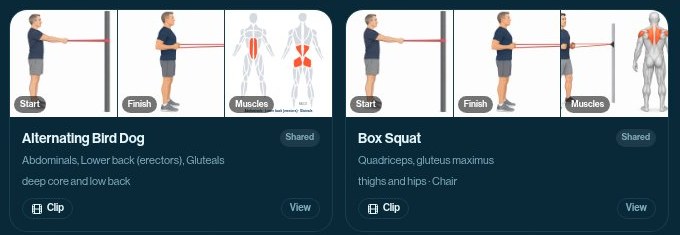
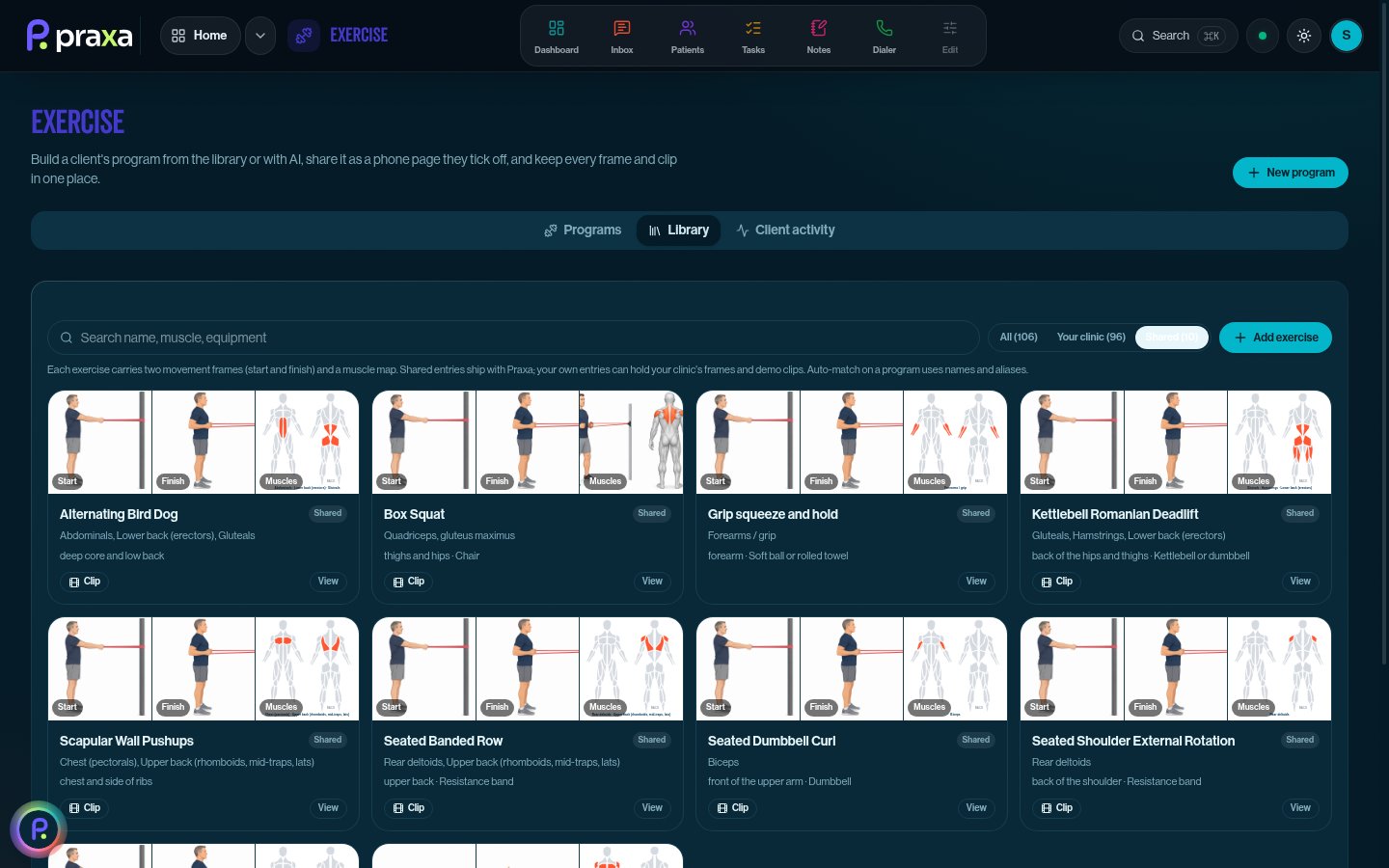
Exercise library cards with start and finish frames and a muscle map
3:00pm
Between sessions

Home programs that match what you meant.

Ask AI for a program from the client's goals, or build one from the library. Every exercise has start and finish frames and a muscle map, so the client does the right thing at home. Change it in plain English with "Edit with AI", then send it as a branded PDF or email.

  • Shared library plus your clinic's own exercises
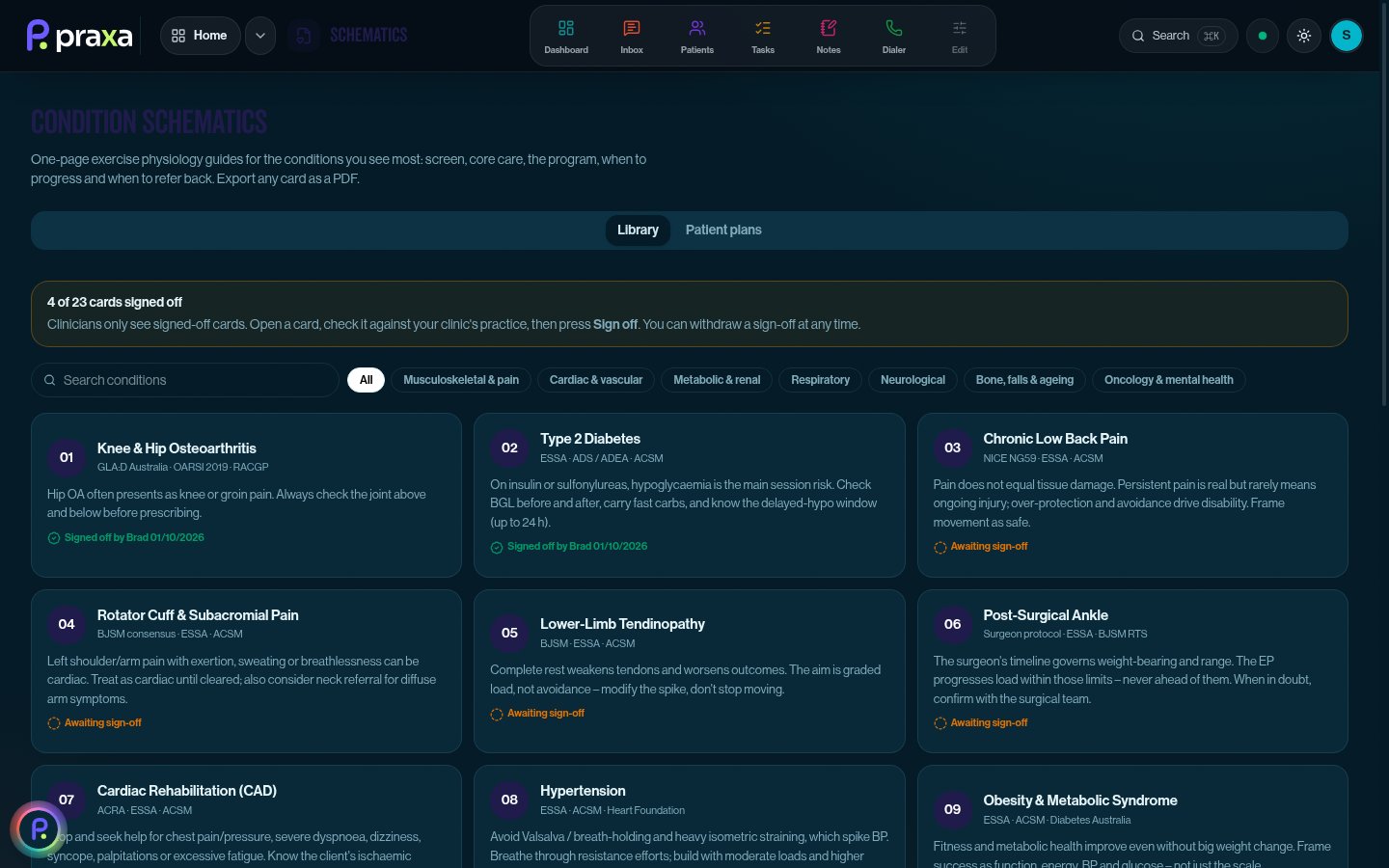
  • 23 condition schematics for exercise physiology
  • Filed to the client record automatically
A clinic owner closing his laptop at the end of the day
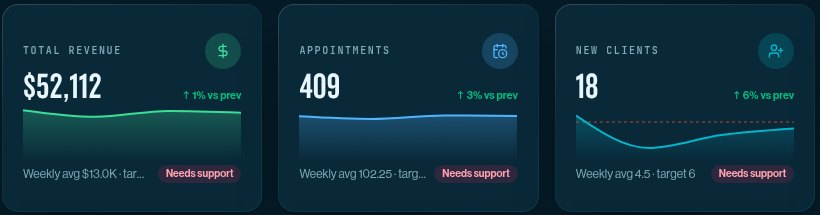
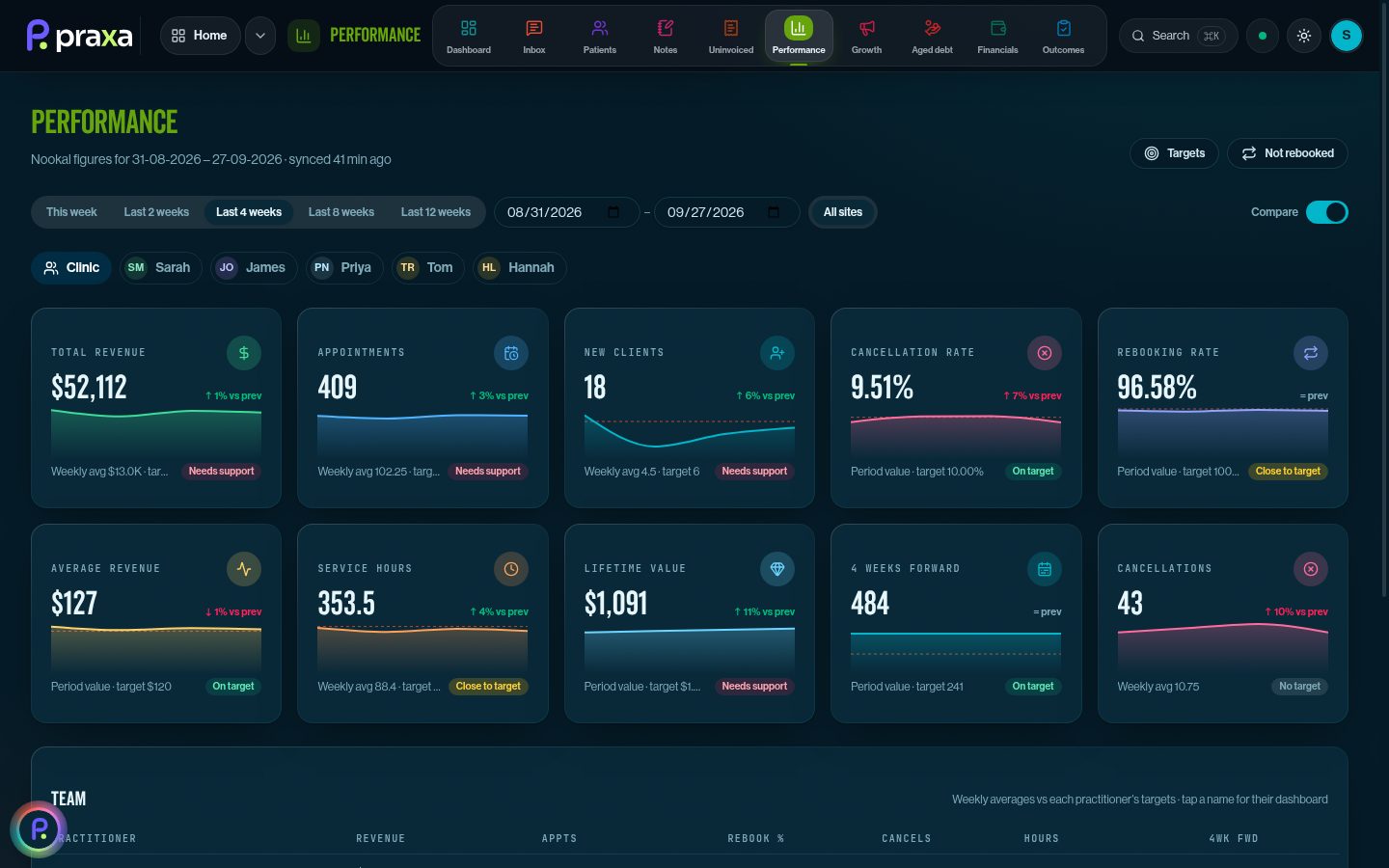
Performance cards: revenue, appointments and new clients against targets
5:30pm
The owner

Know your numbers. Then go home.

Revenue, rebooking, occupancy and new clients per practitioner, straight from the diary. Cash, bills and break-even from your accounts. The roster shows what each day costs against what it earns. No spreadsheet on Sunday night.

  • Clinicians see their own numbers, owners see everything
  • Targets with "needs support" flags
  • 120-day plans that turn into weekly tasks
Made for allied health

Your profession, switched on.

Exercise physiology, physio, OT, dietetics, or all four under one roof. Profession tools switch on for the clinics that use them, and stay out of the way for the ones that don't.

An exercise physiologist helping an older woman with a sit-to-stand exercise
Exercise physiology

23 condition schematics, exercise programs from a shared library, NDIS and DVA forms pre-filled from the note.

A physiotherapist assessing a client's shoulder range of motion
Physiotherapy

Guided MSK assessment with 130 special tests, outcome measures by SMS and GP letters straight from the note.

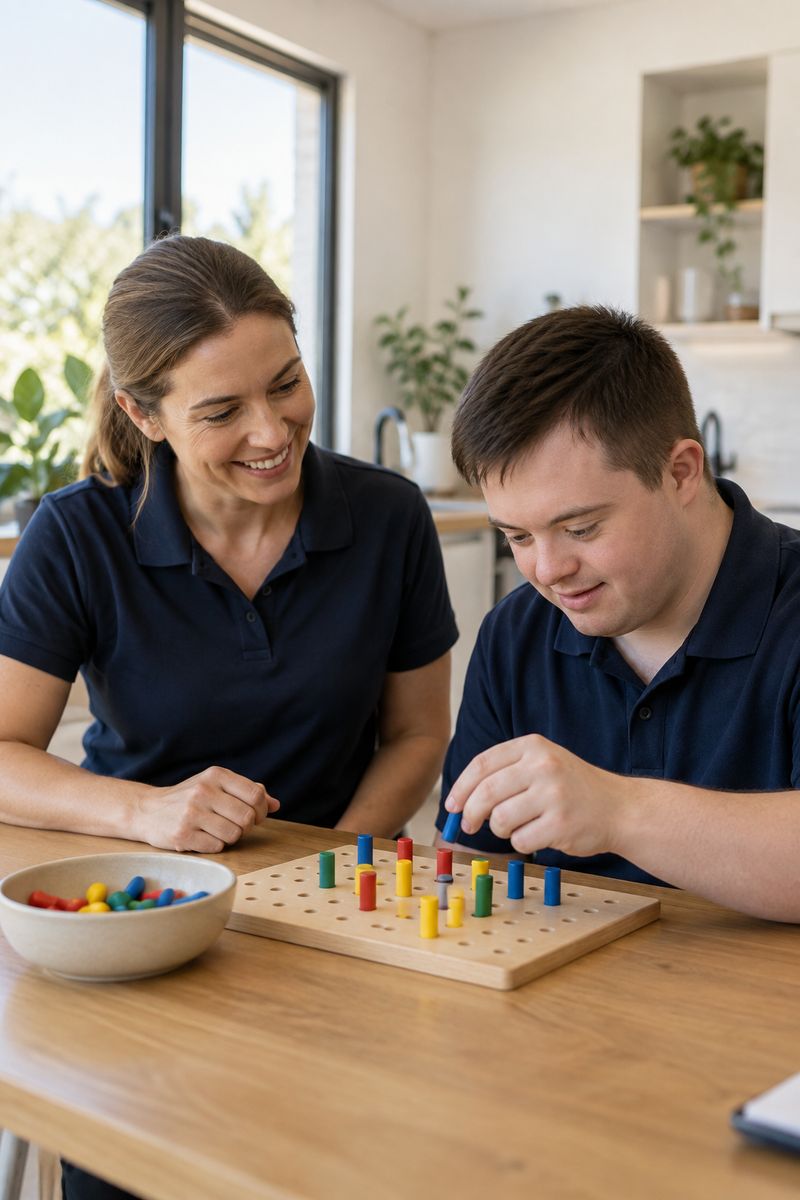
An occupational therapist working with a young adult on a dexterity task
Occupational therapy

NDIS progress reports pre-filled from your session recording, plus a 90-day tracker so no invoice ages out.

A dietitian laughing with a client during a consult
Dietetics

Online intake with conditional sections, AI notes in your template, and rebooking nudges that run themselves.

Product tour

Take a look around.

These are real Praxa screens from our demo clinic, Bayside Allied Health. Same software the beta clinics use, with made-up clients.

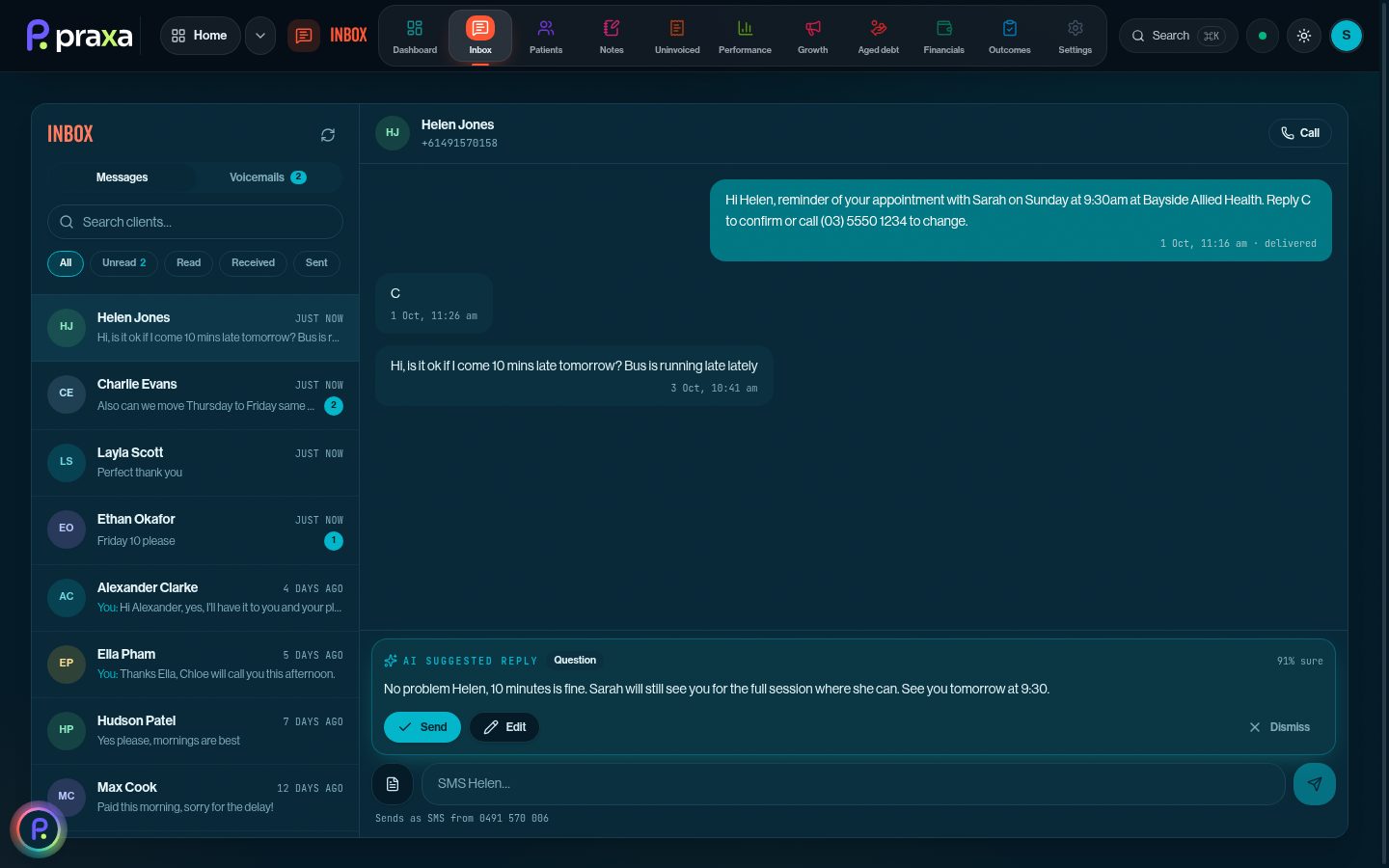
app.praxaclinic.com/inbox
Inbox: one thread per client with an AI suggested reply
One inbox. Every SMS, email and voicemail in one thread per client, with a reply drafted and a confidence score. Send, edit or dismiss.
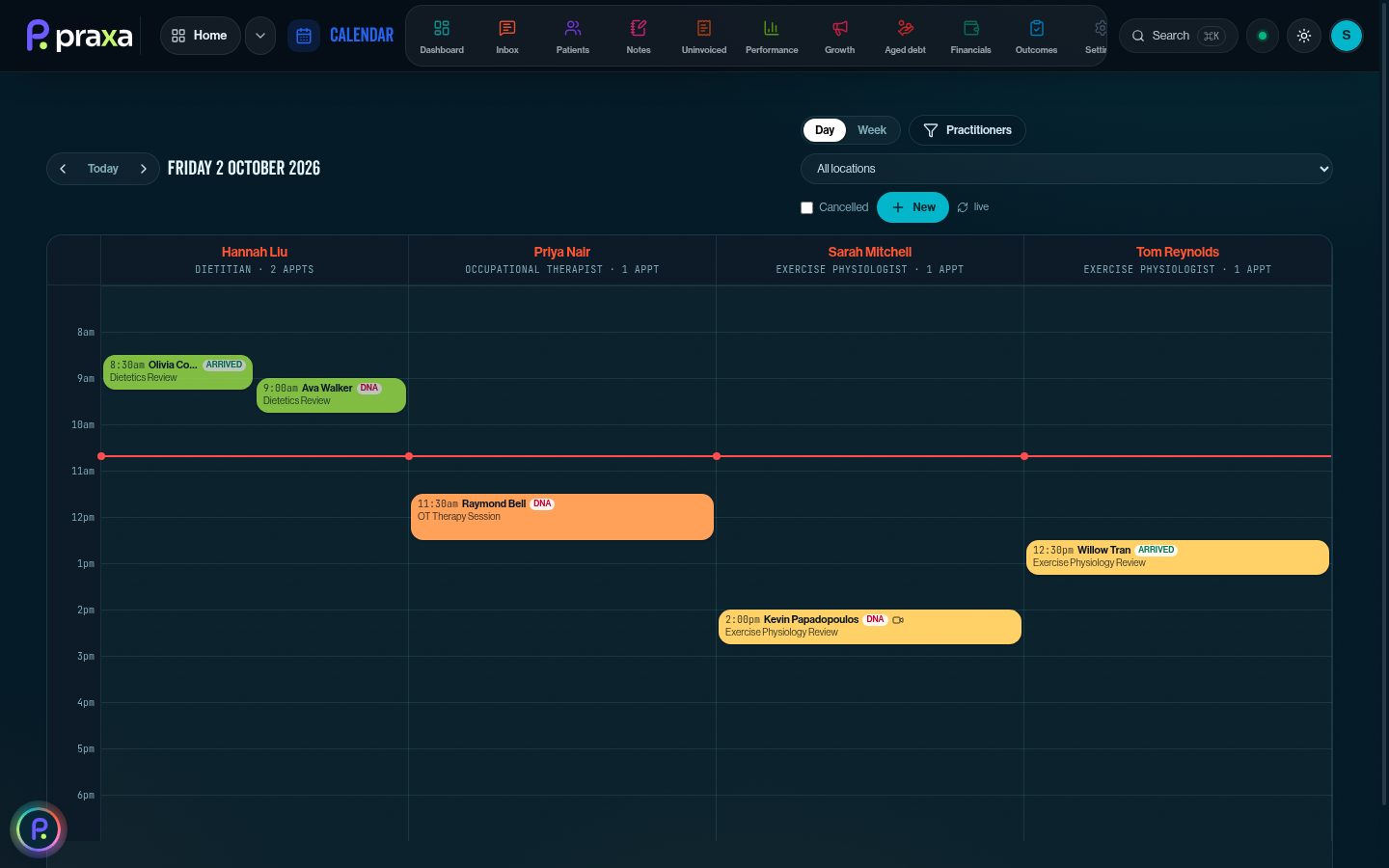
Calendar: practitioner columns with arrived and DNA flags
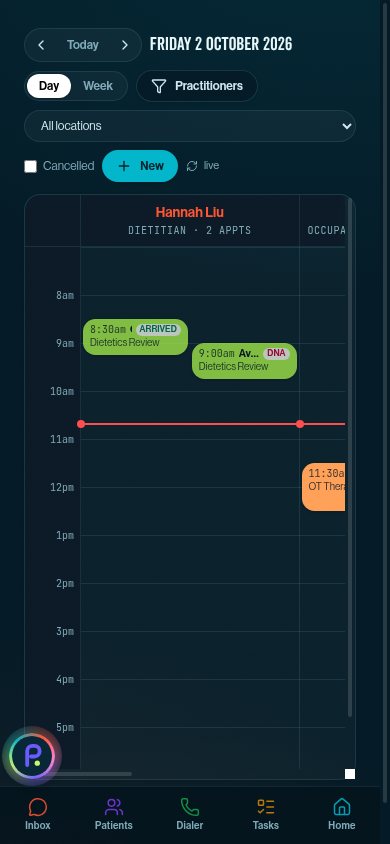
Calendar. A full practice diary on top of your PMS. Arrived, DNA and running-late flags update live from the arrival page.
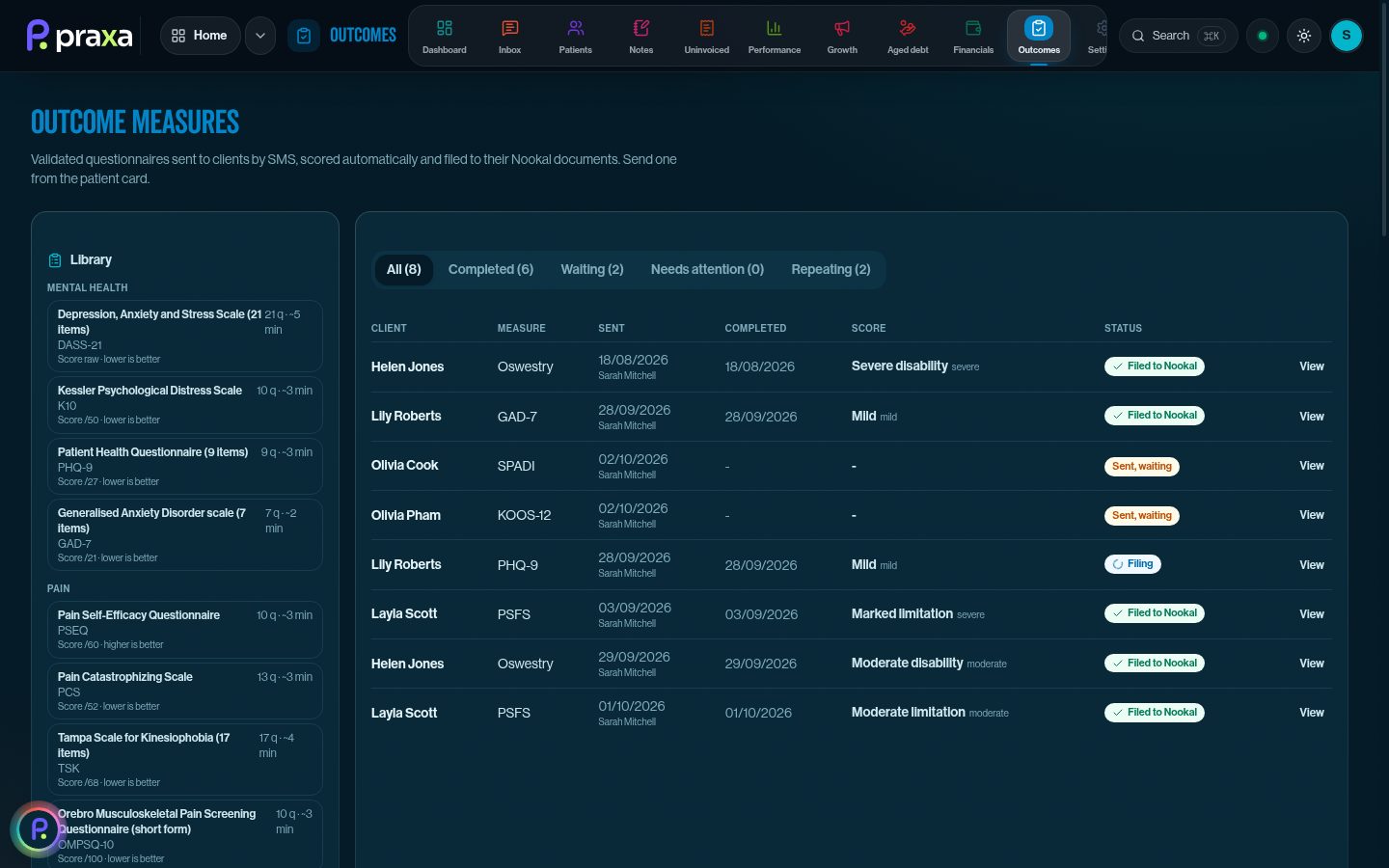
Outcome measures: library and sent questionnaires with scores
Outcome measures. 35 validated questionnaires sent by SMS, scored automatically, re-sent on a schedule and filed to the client record.
Exercise library with start and finish frames and a muscle map
Exercise library. Every exercise with start and finish frames and a muscle map. Search by name, muscle or equipment, and add your own.
Condition schematics library
Condition schematics. 23 one-page exercise physiology guides. Your clinic signs each one off before clinicians see it.
Uninvoiced appointments with expected billing
Uninvoiced. Every kept appointment without an invoice, with the expected billing total. Create the invoice in your PMS in one click.
Aged debt follow-up priority list
Aged debt. Debtors ranked by priority, with escalations, disputes and NDIS 90-day flags. Follow-ups go out on their own.
Performance dashboard with targets
Performance. Revenue, appointments, rebooking and cancellations against targets, for the clinic or any practitioner.
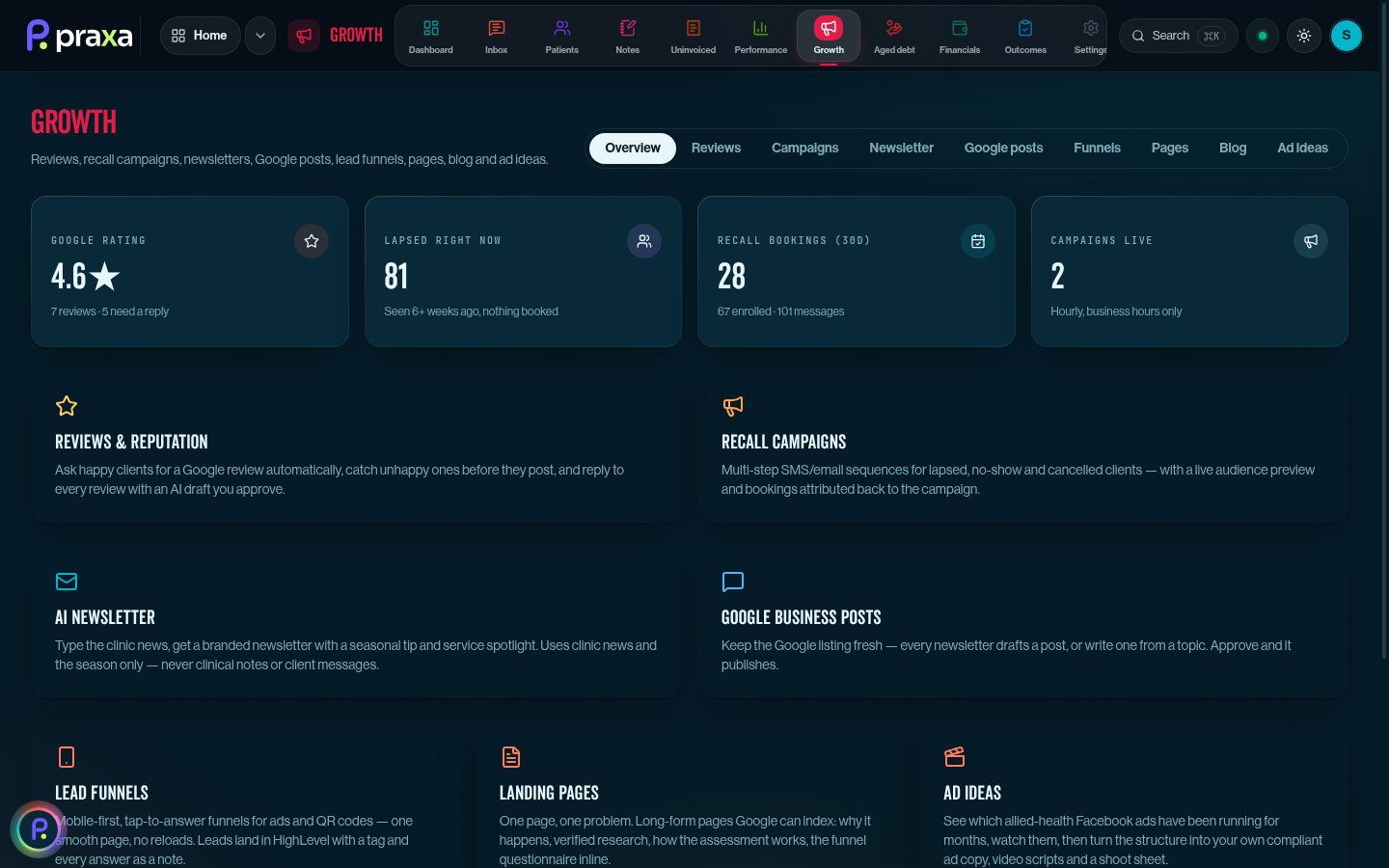
Growth overview: reviews, recalls, newsletters and funnels
Growth. Google reviews, recall campaigns, AI newsletters, Google posts, funnels, landing pages and blog in one place.
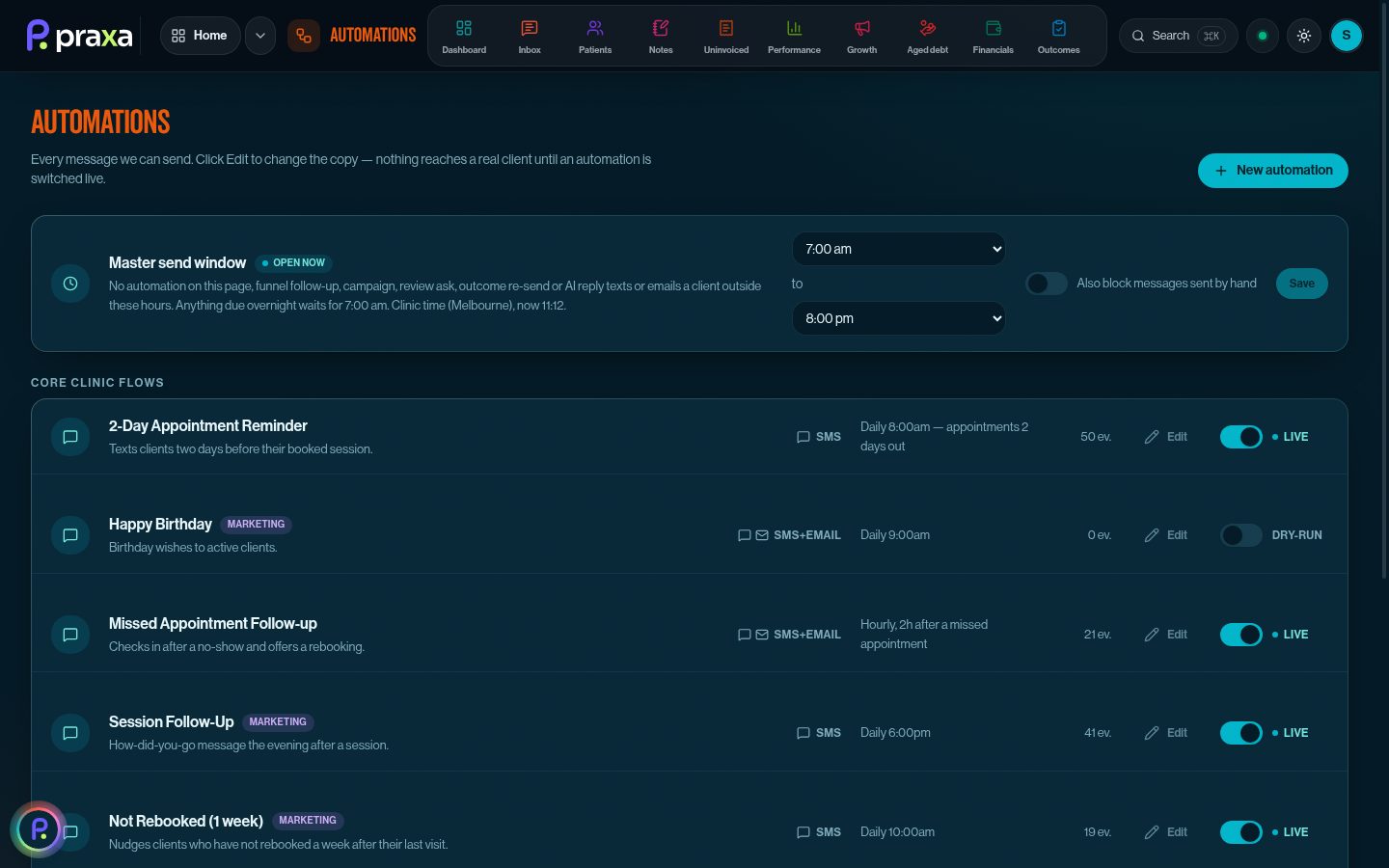
Automations with master send window
Automations. Reminders, follow-ups and rebooking nudges, each with its own switch and a master send window so nothing goes out at 10pm.
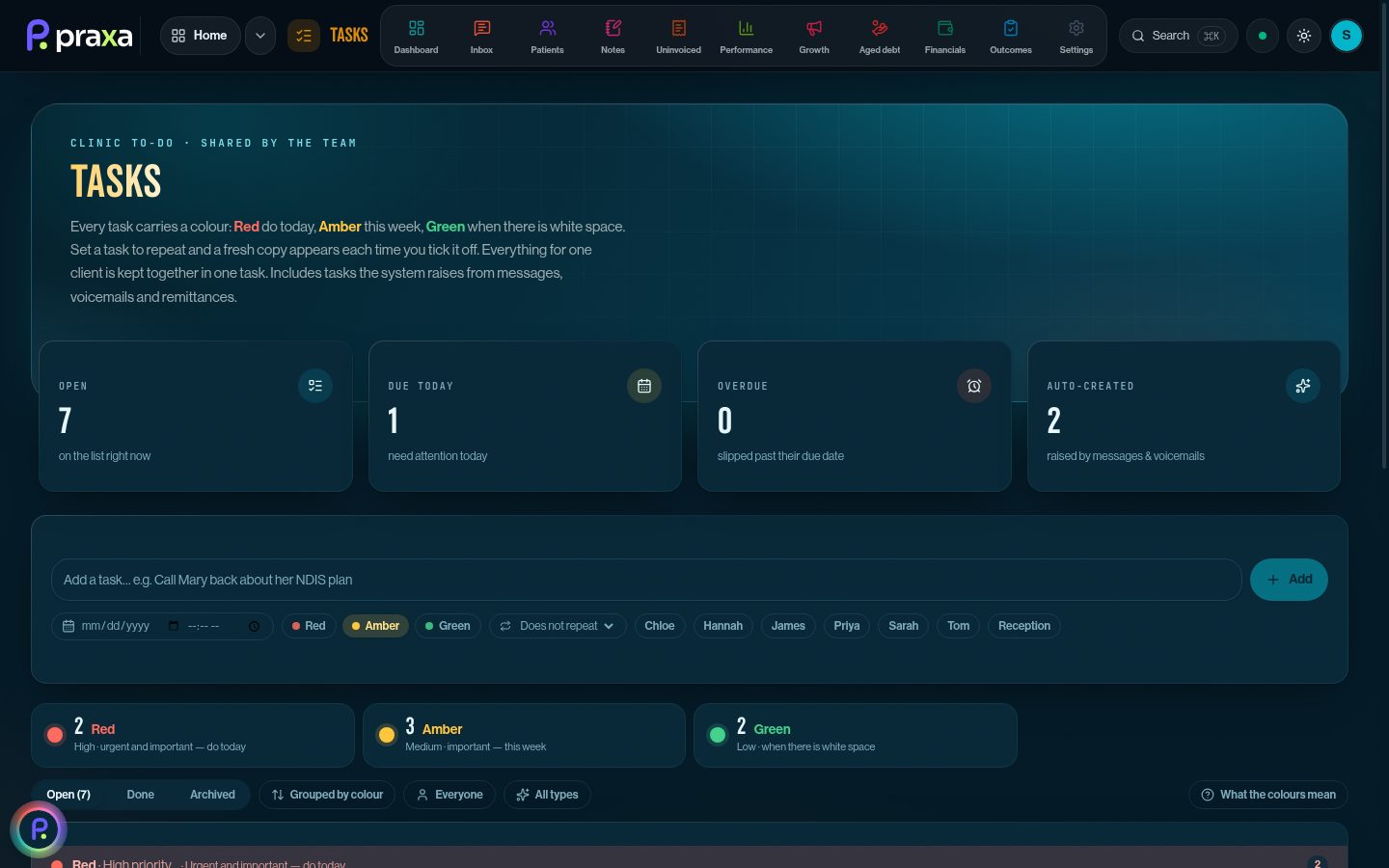
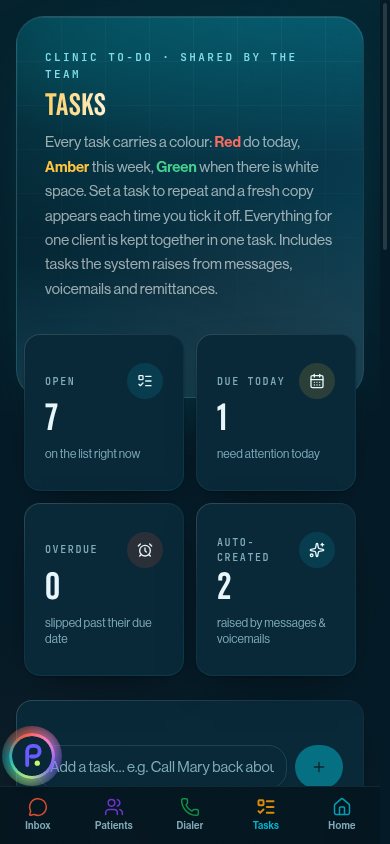
Tasks with red, amber and green priority
Tasks. Red today, amber this week, green when there's white space. Messages, voicemails and remittances raise tasks on their own.
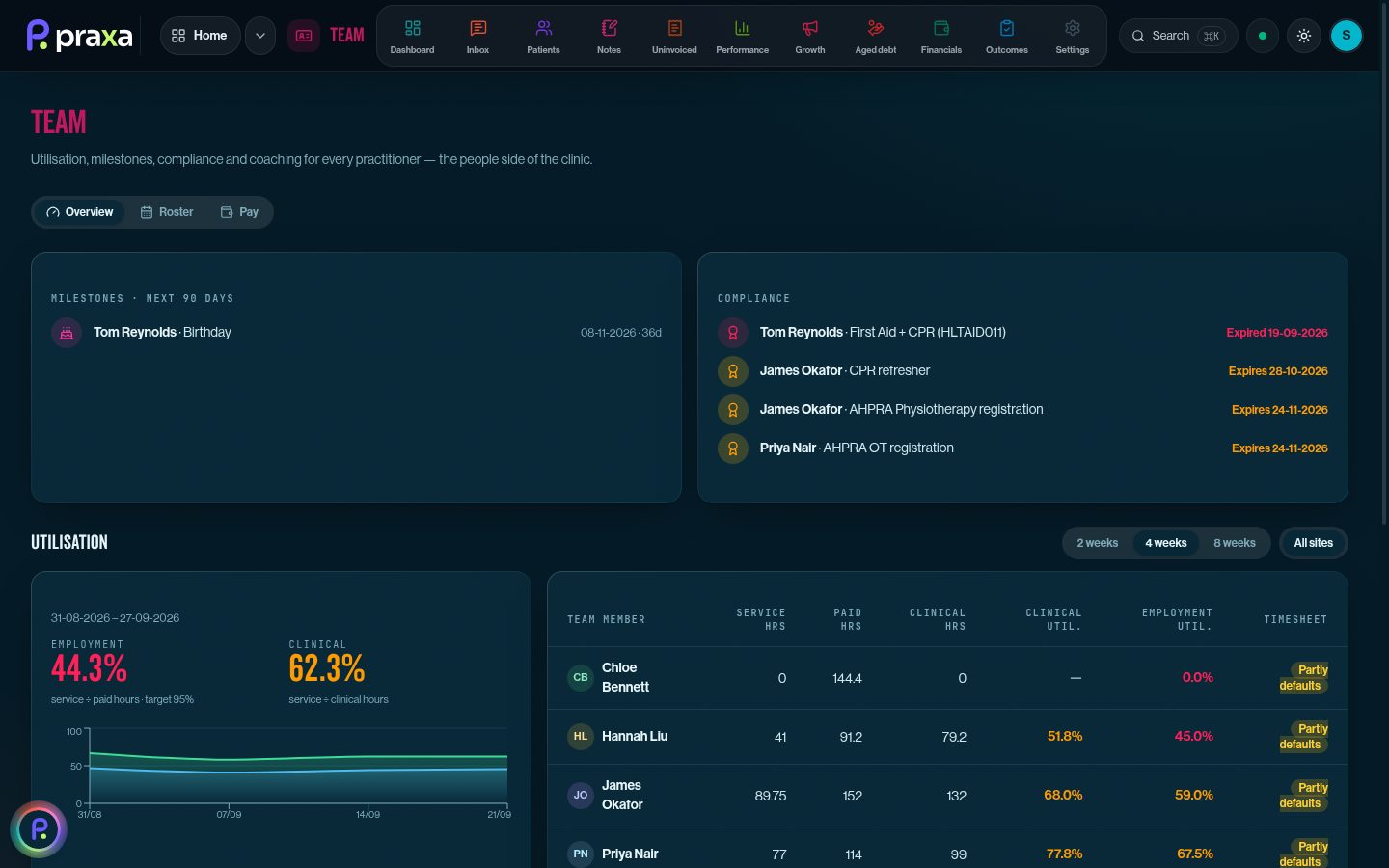
Team: utilisation, compliance and milestones
Team. Utilisation per practitioner, plus first aid, CPR and registration expiries flagged before they lapse. Roster and pay sit alongside.
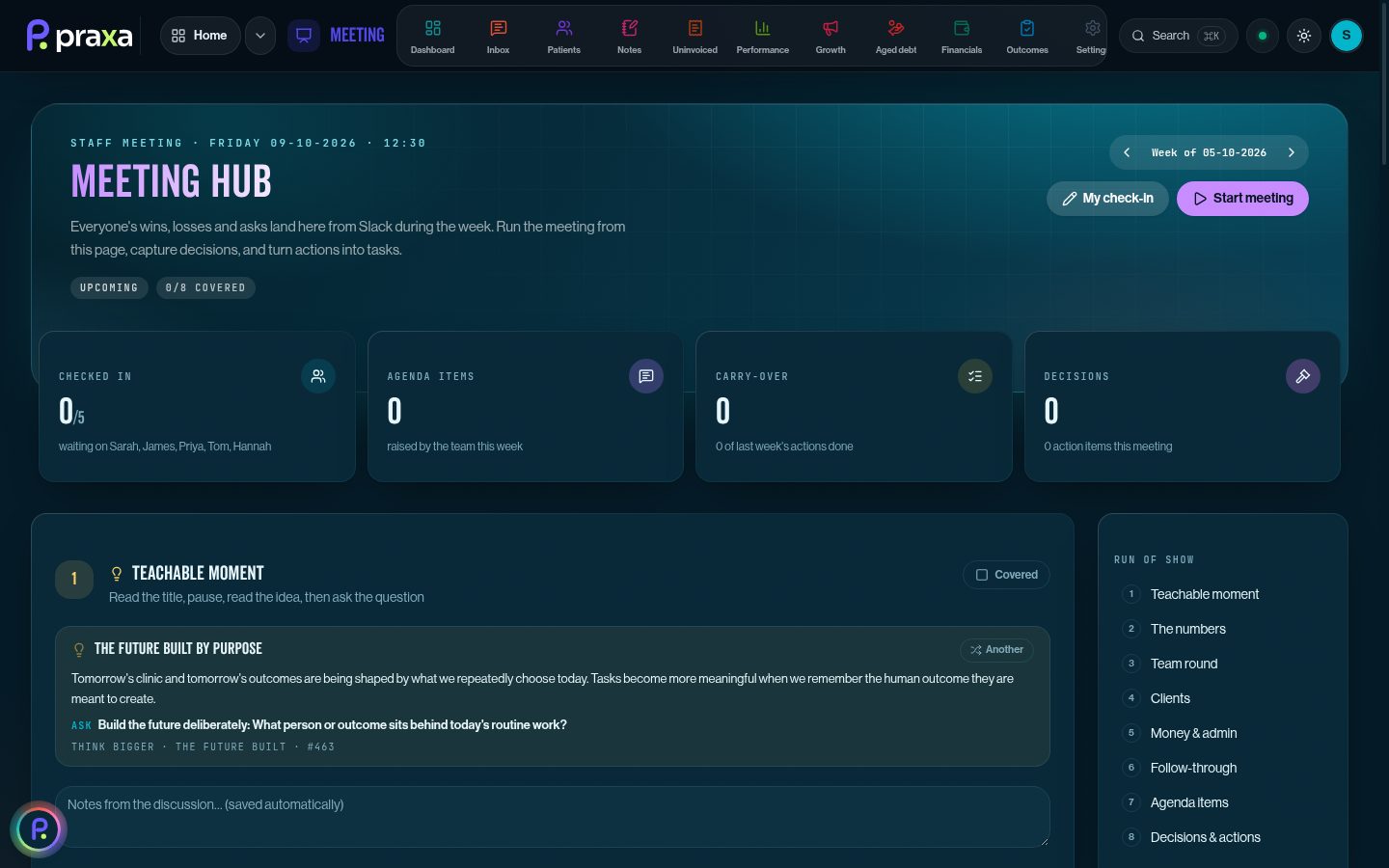
Meeting hub with check-ins and a teachable moment
Meeting hub. Weekly check-ins, agenda, carried-over actions and decisions, with an anonymous team pulse on workload.
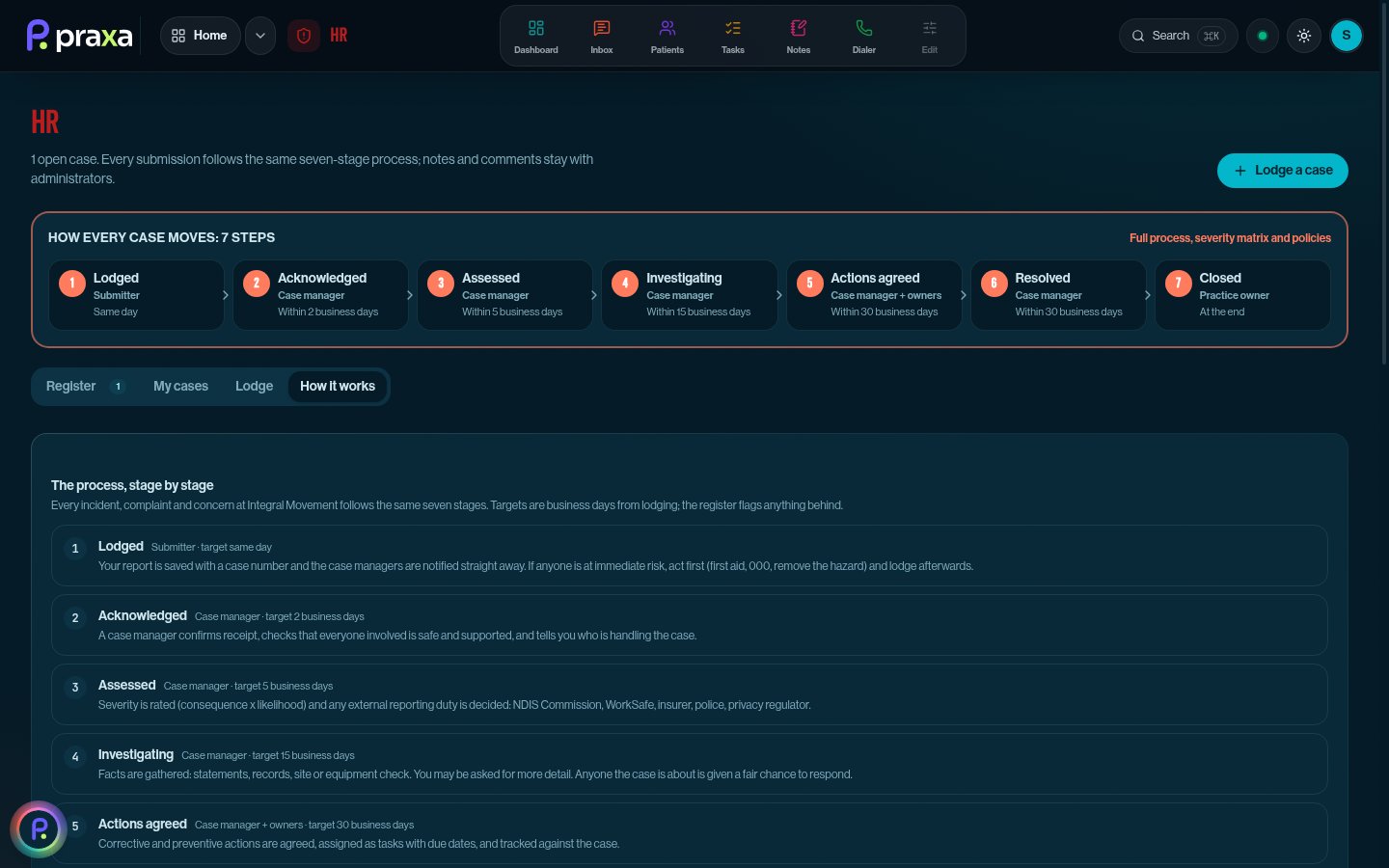
HR: seven-step process for incidents and complaints
HR. Incidents, NDIS reportable incidents, complaints and staff concerns through seven stages with business-day targets.
Praxa on mobile: inbox thread with AI reply
Praxa on mobile: calendar
Praxa on mobile: tasks
Praxa on mobile: aged debt
In the treatment room

Built for the phone in your pocket.

Start a recording, walk to the gym floor, lock the screen and it keeps going. Reply to a text, check the diary, chase a debtor or tick off a task between clients. The whole app works one-handed.

Do the maths

What does your clinic pay for the other nine?

Tick what you use today and put in what you actually pay. The numbers we've started with are rough guides for a small clinic. Change them to your own.

Praxa is one price per clinic, not per practitioner, so the gap gets bigger as you grow.
$
$
$
$
$
$
$
$
You pay now$0
Praxa, founding rate$449
Difference per year$0
Monthly, AUD ex GST. Founding rate is $449/month billed annually; standard price $499/month.
What's inside

25 modules. One login.

Your practice-management system is good at the diary and the invoice. Praxa does the hundred things that happen before, after and in between. Switch on what your clinic needs; leave the rest off.

01

Front desk & diary

Every message, booking and arrival in one place, so reception isn't juggling four screens.

Calendar

New

A full practice diary on top of your PMS. Practitioner columns, drag to move, book or block time, and events for several staff at once.

Arrival page

New

A text two hours before each visit. Clients tap On my way, I've arrived, Running late or Reschedule, and the diary updates live.

Booking from one screen

New

Book a new client, rebook "same time next week", or book a lead straight from the pipeline. The intake form goes out automatically.

Online intake & consent

New

Your intake form with conditional sections and a signature, written back to the client record with a PDF in their file.

One inbox

SMS, email and voicemail in one thread per patient. AI drafts replies in a plain human voice, plus saved templates and a "Needs a response" list.

AI phone receptionist

Answers on your clinic number, follows your script, books into the diary and never guesses. Anything it can't answer becomes a task.

Group classes, handled

New

Class attendees get the same reminders and follow-ups as 1:1 clients, can be marked no-show, and count as visits in every report.

02

Clinical

Built by clinicians. Less typing, better assessments, and programs your clients actually follow.

AI scribe that lives in the diary

Tap the appointment, hit record, treat. Recording keeps going while you move around or lock your phone. When you stop, the note is drafted in your template with the case and referrer pulled through and NDIS or DVA forms pre-filled. Audio is never kept.

Guided initial assessment

New

Step-by-step MSK intake inside the note: subjective prompts, 130 special tests across 10 regions, force plate, motion capture and dynamometry results, re-test comparisons and one PDF filed to the PMS.

Outcome measures

New

35 validated questionnaires (DASS-21, PSFS, KOOS, SPADI and more) sent by SMS, scored automatically, re-sent on a schedule and filed to the client record.

Exercise programs

New

AI drafts the program, every exercise comes from a shared library with start and finish frames and a muscle map. Change it in plain English with "Edit with AI", then send it as a PDF or email.

Condition schematics

New

23 one-page exercise physiology guides: screening, core care, the program, when to progress and when to refer back. Matched from the intake form and turned into a clinician-approved client plan.

Letters, reports & records

New

GP and referrer letters with each practitioner's signature, send-on-behalf approvals so nothing goes out unsigned, manual notes for calls and case conferences, and records-release requests handled end to end.

03

Billing & money

Nothing slips through: every visit invoiced, every debtor followed up, every dollar reconciled.

Uninvoiced, gone by lunch

Every arrived appointment, class participant or pass without an invoice, in one list. Create it in your PMS with one click, late cancels with the right NDIS code.

Aged debt that chases itself

Debtors ranked by priority, emails to plan managers at 7, 14 and 21 days, then a phone-call task. Per-payer off switch.

NDIS 90-day tracker

New

Plan-managed and NDIA invoices on a live 90-day clock, flagged as they get close, with the notice ready to send before the claim window shuts.

Remittances, matched

New

Forward your remittance emails to Praxa. Each line is read, matched to the invoice and checked against your PMS, with a task for anything that doesn't add up.

Financials

New

Cash position, trends, upcoming expenses and bank reconciliation from Xero, measured against your clinic's financial health targets.

Break-even & forecasting

New

Model practitioners, hours, fees and expenses, fill it from live data, and see exactly how many clients a week keep the lights on.

04

Growth

New clients in, lapsed clients back, and a marketing engine that respects AHPRA rules.

Reviews

Google review asks sent at the right moment, and one polite nudge if a five-star rating never turns into a review.

Funnels & landing pages

New

Quiz funnels and one-problem landing pages on your own domain, with booking built in and every lead tracked to its source.

AI blog writer

New

Articles in your clinic's voice, research claims checked against PubMed, advertising rules applied, published straight to your WordPress site.

Campaigns & segments

Newsletters and recalls to saved audiences, with consent checked for every channel before anything is sent.

Automations

Reminders, rebooking nudges and lapsed-client follow-ups that run inside your send window, with every message in an activity log.

Opportunities

Every enquiry on a live board. Log calls, mark out-of-area, and book a lead into the diary without leaving the card.

05

Team & HR

The way a well-run clinic runs its people, built in rather than bolted on.

The 10-minute daily huddle

New

On screen every morning: what's up with each person, today's client activity and white space, one of your core values, and a one-minute teachable moment from a 1,000-entry library. Short training video optional. Log it and move on.

Tasks that get done

New

Red, amber and green priority, repeating tasks, one task per client instead of five, and a gentle hourly reminder for anything overdue.

Meetings & team pulse

New

Weekly agenda and check-ins in one place, plus an anonymous team pulse on workload so problems surface early.

Roster & pay

New

Shifts by week for every practitioner, with what each day costs in wages and on-costs against what it earns.

Recruitment

New

Roles, website and job board applications in one pipeline. Phone, culture, clinical and reference interviews, recorded and summarised by AI.

HR: incidents & complaints

New

Incidents, NDIS reportable incidents, complaints and staff concerns through a seven-stage process with severity ratings, a reporting checklist and private admin notes.

Handbook

Policies, procedures and training in one library, with team sign-off tracked per document.

Performance

Occupancy, rebooking and revenue per practitioner from your live diary. Clinicians see their own numbers, owners see everything.

120-day plans

New

Pick the few projects that matter, plan them month by month, push the actions to tasks, and write down what you're not doing.

06

AI & setup

AI where it saves time, with guard rails where it matters.

Praxa assistant

New

Ask "who's free Thursday afternoon?" or "block Friday 2 to 4 for the team meeting". Patient names are stripped before any question reaches AI.

Setup wizard

New

Connect your PMS, messaging and AI, pick your modules and invite the team, step by step, with a test for every connection.

Made for your profession

Exercise physiology, physiotherapy, OT, dietetics and multidisciplinary clinics. Profession tools like the guided MSK assessment and condition schematics switch on for the clinics that use them.

What's new

Shipped in the last four weeks.

Praxa runs a real clinic every day, so it gets better every week. Beta clinics get every release the day it ships, and a say in what comes next.

OCTOBER

Team pulse & teachable moments

Anonymous weekly workload ratings in the check-in, and a one-minute lesson in every huddle.

OCTOBER

Condition schematics

23 exercise physiology condition guides, matched from the intake and turned into client plans.

OCTOBER

One task per client

Several actions for the same client fold into a single task, with hourly reminders for overdue work.

SEPTEMBER

HR module

Incidents, complaints and staff concerns through a seven-stage process with SMS and email updates.

SEPTEMBER

Exercise module

Program builder, shared library with frames and muscle maps, AI drafting and "Edit with AI".

SEPTEMBER

Recruitment interviews

Phone, culture, clinical and reference stages, recorded and summarised, with job board applications imported.

SEPTEMBER

Guided MSK assessment

Special tests, force plate and dynamometry results and re-test comparisons inside the note.

SEPTEMBER

Arrival page & calendar

On my way, arrived and running late from the client's phone, on a full-page practice diary.

SEPTEMBER

Roster, pay & break-even

Weekly shifts with day costs against revenue, and a break-even model filled from live data.

SEPTEMBER

NDIS 90-day tracker

Plan-managed and NDIA invoices on a live clock, flagged before the claim window closes.

SEPTEMBER

Blog writer & landing pages

Research-checked articles to WordPress and one-problem landing pages on your own domain.

SEPTEMBER

Intake, outcomes & assistant

Online intake and consent, 35 outcome measures by SMS, and an assistant that answers diary questions.

How it works

Live in a week. Nothing to migrate.

Praxa reads from and writes to the system you already use. Your diary, patients, invoices and reports stay exactly where they are.

01

Connect your PMS

Paste your Nookal or Cliniko API key. Practitioners, locations, services and passes pull through automatically. First sync takes minutes.

02

Run the setup wizard

We provision your clinic's SMS and voice number, then the wizard walks you through templates, reminder wording, collections emails and which modules to switch on. All editable later.

03

Invite the team

Owners invite staff by email. Everyone gets the huddle, the diary, their notes and their tasks. Cancel the other nine subscriptions.

Beta program

Ten clinics. Then we close the doors.

We're onboarding ten allied health clinics as beta testers before public launch. You get Praxa on your own clinic, hands-on setup with the founders, and a say in what gets built next.

What beta clinics get

Full access to every module, on Nookal or Cliniko, with direct support while we shape the product around real clinics.

10of 10 spots left
  • Founding-clinic rate locked in for life ($449/mo, annual)
  • Setup, template import and team onboarding done with you
  • Direct line to the builders; your requests go to the top of the list
  • No lock-in: leave any time during the beta
We'll reply within one business day. No spam, no newsletter, just a real conversation about your clinic.
Pricing

One price. Unlimited practitioners.

No per-seat maths. Add your next clinician without adding a line to the bill.

Praxa Clinic
$499 / clinic / month
  • Unlimited practitioners and admin users
  • All 25 modules: front desk, clinical, billing, growth, team and HR
  • Nookal or Cliniko connection included
  • Dedicated clinic SMS and voice number (usage billed at cost)
  • Setup and template import with a real human
Join the beta
Founding clinics
$449 / month

Early-adopter rate, locked in.

The first clinics to join pay $449 a month on an annual plan, keep that rate, and get a direct line to the people building Praxa. You tell us what your clinic needs next; we build it.

Prices in AUD, excluding GST.

Questions

The things clinic owners ask first.

Do I have to leave Nookal or Cliniko?

No. Praxa is built to sit on top of your practice-management system, not replace it. Your diary, patient records, invoices and reports stay there. Praxa syncs every few minutes and writes bookings, invoices, notes and cancellations back with the right codes.

Where are clinical notes and recordings stored?

Notes, letters, assessments and outcome measures are filed into your PMS. Session audio is transcribed and then discarded; Praxa does not keep recordings. Access is email + password with a 2-factor code and invite-only team accounts.

What does the AI see?

Only what it needs for the job in front of it. The assistant strips patient names before a question reaches AI, inbox replies follow strict tone and safety rules, and you choose whether the inbox AI is off, suggests replies for staff to approve, or sends routine ones itself. Every clinical draft is reviewed by a clinician before it's filed.

Does it handle NDIS and DVA billing quirks?

Yes. Praxa knows your service codes, appends the _CA cancellation code for NDIS late cancels, invoices class participants individually, redeems passes, tracks plan-managed invoices against the 90-day claim window, and follows up plan managers by email rather than texting a business number.

Which professions is it built for?

Exercise physiology, physiotherapy, occupational therapy, dietetics and multidisciplinary allied health clinics. Profession-specific tools, like the guided MSK assessment and condition schematics, switch on for the clinics that use them.

How does the phone receptionist work?

Your clinic gets a dedicated number. Calls are answered by an AI receptionist that follows your script (opening hours, parking, fees, booking rules) and logs everything to the patient inbox. It never guesses; anything it can't answer becomes a task for your front desk.

Can we use it for NDIS incident management?

Yes. The HR module has an NDIS reportable incident type with the Commission's reporting timeframes on its checklist, alongside WorkSafe, insurer and privacy notifications, a severity matrix and a seven-stage process with a full record of every step.

What if we have five practitioners next year, or twenty?

Same price. Praxa is per clinic, not per seat.

Can we turn parts of it off?

Yes. Every module can be switched on or off per clinic, and every automation (review asks, collections emails, reminders, arrival texts) has its own off switch. Collections can be paused per plan manager.
See your clinic in Praxa.

A 30-minute walkthrough using your own diary. We'll show you what gets replaced, what gets automated, and what Monday looks like with one system.